TradeLogger: a trading journal built for active traders
More than a basic logbook — structured logging, AI-assisted review, and workflows that make post-trade analysis repeatable.
TradeLogger is built for traders who want more than a basic logbook. Our trading journal app helps day traders, swing traders, and active investors capture trades, review performance, and spot the patterns that actually affect results.
Instead of leaving you with scattered screenshots, rough notes, and end-of-week guesswork, TradeLogger gives you a structured place to log trades, track emotions, compare strategies, and get AI-assisted analysis. You can journal manually, upload screenshots, review your calendar, and use coaching-style feedback to tighten your edge over time.
TradeLogger gives active traders a faster, more structured journaling workflow
TradeLogger combines a digital trading journal with analytics that make review easier to sustain. You can record unlimited trade entries, track entry and exit points, add rich-text notes, attach screenshots, tag strategies, log emotional context, and revisit trades in a calendar view instead of hunting through folders or spreadsheets.
That structure matters because improvement usually breaks down at the review stage, not the execution stage. TradeLogger turns each trade into a searchable record you can analyze later by setup, behavior, timeframe, and outcome.
TradeLogger brings unlimited trade entries, screenshot attachments, strategy tagging, emotion tracking, and a trading calendar into one journal workflow.
TradeLogger also supports cloud sync and mobile apps for iOS and Android, which makes it easier to capture a trade when it is fresh and review it later from your phone or web dashboard. If you trade actively, that reduces the friction that usually kills consistency.
AI screenshot analysis for traders who want less manual logging
One of the clearest reasons traders choose TradeLogger is the screenshot-first workflow. TradeLogger uses AI screenshot analysis to extract trade details from uploaded images, and the platform publicly states that setup can take under 30 seconds, extraction can happen in under 5 seconds, and the workflow works with any broker platform through screenshots.
TradeLogger reports AI screenshot extraction in under 5 seconds and says the screenshot workflow works with any broker platform.
That is especially useful if you trade across different platforms or do not want to depend on a narrow list of direct broker integrations. You can use the screenshots you already save from your charts or broker, convert them into structured records, and move into review faster.
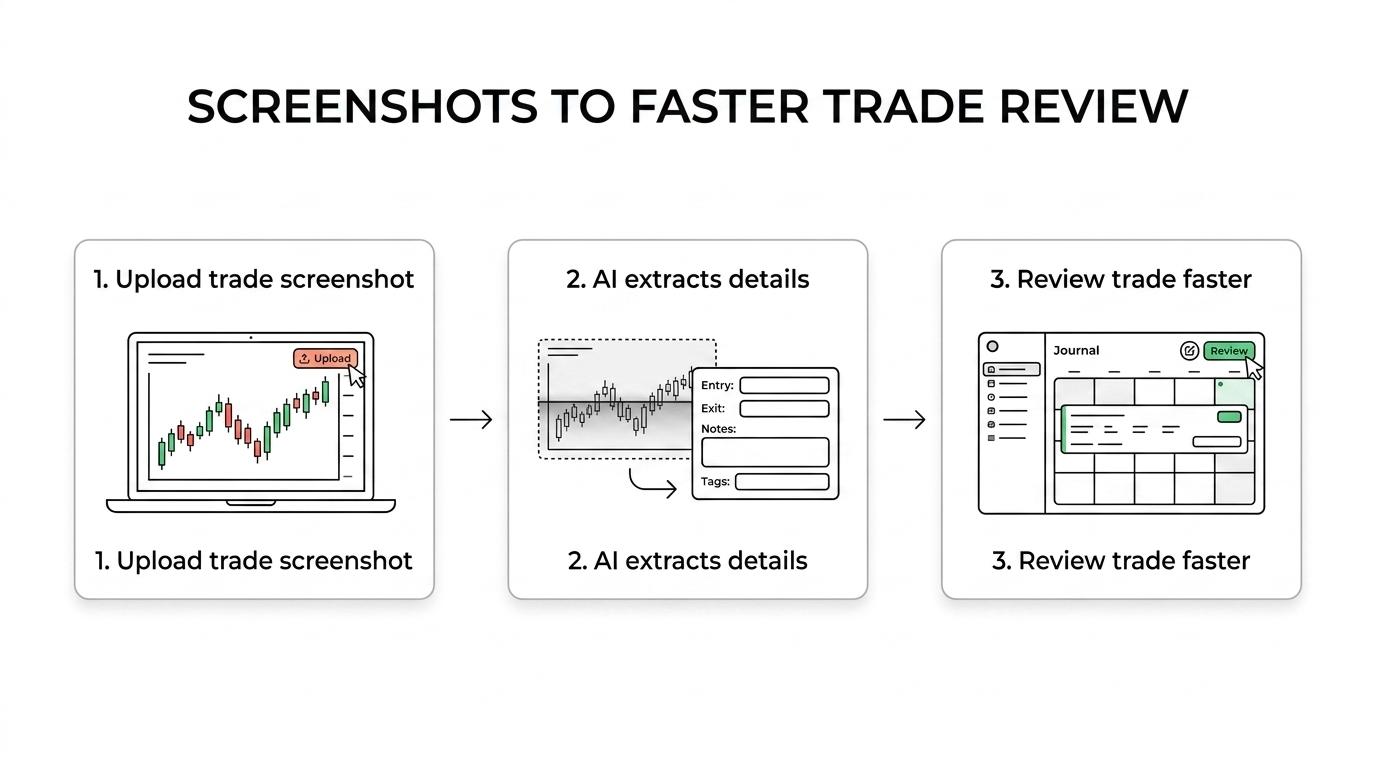
TradeLogger does not force you into a single input method, either. If you prefer to type trades in yourself, manual trade entry is available, so you can keep your journal complete even when a screenshot does not tell the full story.
TradeLogger analytics help you find what is working, what is leaking, and why
A journal only helps if it leads to decisions. TradeLogger gives you P&L analysis, win and loss ratios, risk-reward metrics, performance trends, strategy comparison, progress tracking, goal setting, performance alerts, and monthly and yearly reports so you can see which habits and setups deserve more capital and which ones need to be cut.
TradeLogger goes further than many journals by focusing on behavior as well as numbers. The platform includes AI trade summaries, pattern recognition, improvement suggestions, risk assessment, market condition analysis, behavioral pattern recognition, confidence scoring, FOMO detection, and revenge-trading alerts, so your review is not limited to whether a trade made or lost money.
TradeLogger pairs emotion tracking with FOMO detection and revenge-trading alerts, not just P&L charts.
If your biggest leaks are overtrading, forcing setups, or breaking plan after a loss, that extra behavioral layer can make the journal more useful. TradeLogger helps you connect your results to your decisions, not just your entries and exits.
A trading journal app with emotion tracking, coaching, and learning support
TradeLogger is a strong fit for traders who know execution is only part of the problem. Emotion tracking is built into the journal, which helps you review how confidence, hesitation, fear of missing out, or frustration show up in your results over time.
TradeLogger also adds a coaching element to the platform with personalized feedback, custom improvement plans, weekly performance reviews, and milestone tracking on its public product pages. For traders who want more direct guidance, TradeLogger also presents a separate Personal Mentorship Program with one-on-one coaching sessions, a personalized development plan, exclusive resources, and direct feedback and support.
Outside the app itself, TradeLogger offers educational resources around trading basics, risk management, and trading psychology. That gives you a place to work on process, not just record outcomes.
TradeLogger's broader community features appear to be on the roadmap, while the current public offer is centered on the journal, analytics, resources, and coaching support. For many traders, that is the right order anyway. First build the habit, then add outside accountability.
Transparent TradeLogger pricing makes it easier to start without overcommitting
TradeLogger keeps pricing simple and publicly visible, which matters when you are comparing journal apps. Current public pricing includes a weekly option, a yearly option, and a lifetime option — see pricing for the latest figures and subscription details.
(Pricing and trials change over time; the article below reflected a snapshot with weekly/yearly/lifetime tiers.)
- Weekly: $2.99
- Yearly: $29.99
- Lifetime: $79.99
- Trial: check current plans on /pricing (subscription options update over time).
TradeLogger pricing starts at $2.99 per week, with a $29.99 yearly plan and a $79.99 lifetime option.
For active traders, that lowers the barrier to building a real review process. You can start small, see whether the workflow fits your routine, and upgrade only if the habit sticks.
When TradeLogger is the right trading journal app for your style
TradeLogger is a particularly strong choice if you are a discretionary trader who learns visually, wants to review screenshots, and needs a faster path from trade capture to trade analysis. It fits day traders, swing traders, and active investors who want structured journaling, AI-assisted feedback, and psychology-aware review without paying enterprise-level journal pricing.
TradeLogger is also a good fit if you want one place for notes, screenshots, strategy tags, emotional context, reports, and performance review. That kind of consolidation makes post-trade analysis more repeatable.
There are also cases where you should ask more detailed questions before choosing a plan. If your workflow depends on named direct broker API sync, a fully documented mobile-versus-desktop feature matrix, or advanced options-specific journaling such as multi-leg tracking and Greeks, get clarity on your exact use case first. TradeLogger's public materials are strongest around screenshot ingestion, manual journaling, AI analysis, and behavioral review.
That honesty matters because the best journal is the one that matches how you actually trade. TradeLogger is built to reduce logging friction and improve review quality, not to pretend every trader needs the same workflow.
Why traders trust TradeLogger with ongoing review
TradeLogger earns attention by making the value proposition clear. The platform publicly shows what is included, who it helps, and how pricing works. It also combines practical journal features like manual entry, screenshots, notes, strategy tags, reports, and cloud sync with more specialized tools like emotion tracking and AI-generated analysis.
TradeLogger also states bank-grade security on its public feature pages, which is important when your journal contains trade history, notes, and performance records. Paired with mobile access and synced data, that gives you a review environment built for daily use rather than occasional cleanup.
If you are ready to stop relying on memory, screenshots scattered across devices, or end-of-month guesswork, start with TradeLogger and turn your trades into a review process you can actually follow. Choose the plan that fits your pace, begin logging trades, and use the data to sharpen your edge.
Start your review habit
Log trades, attach screenshots, and use AI-assisted analysis — all in one trading journal workflow.